[:en]I’m making a continuation of the article dedicated to the problem of having 2 USB-Serial cables of the same brand and the same reference. Indeed I could not choose in Smartphoton which cable went to which equipment. I had nothing to identify them. So I worked on a complete redesign of the ‘System – USB Devices’ menu
This will allow the user to select himself his inverter cable and his battery cable and to give the indication to my software where is how to access each interface.
The concrete problem is this, 2 identical usb, how to know which is the inverter and which is the Pylontech battery:
| Bus 001 Device 005: ID 067b:23a3 Prolific Technology, Inc. ATEN USB to Serial Bridge |
| Bus 001 Device 004: ID 067b:23a3 Prolific Technology, Inc. ATEN USB to Serial Bridge |
I was able to address this problem with Linux commands that allow me to find where each cable is physically located. So I can show each USB port with what is connected and to which USB port. It looks like this.
Marche à suivre:
- Connect the first USB cable, the one that is connected to the UPS for example, go to the System menu and note which USB port Linux has assigned to it. Use the button« Sel. USB Onduleur » and ‘valider’
- Then proceed with the 2nd cable and assign it with the button « Sel. USB Pylontech »
Small démo:
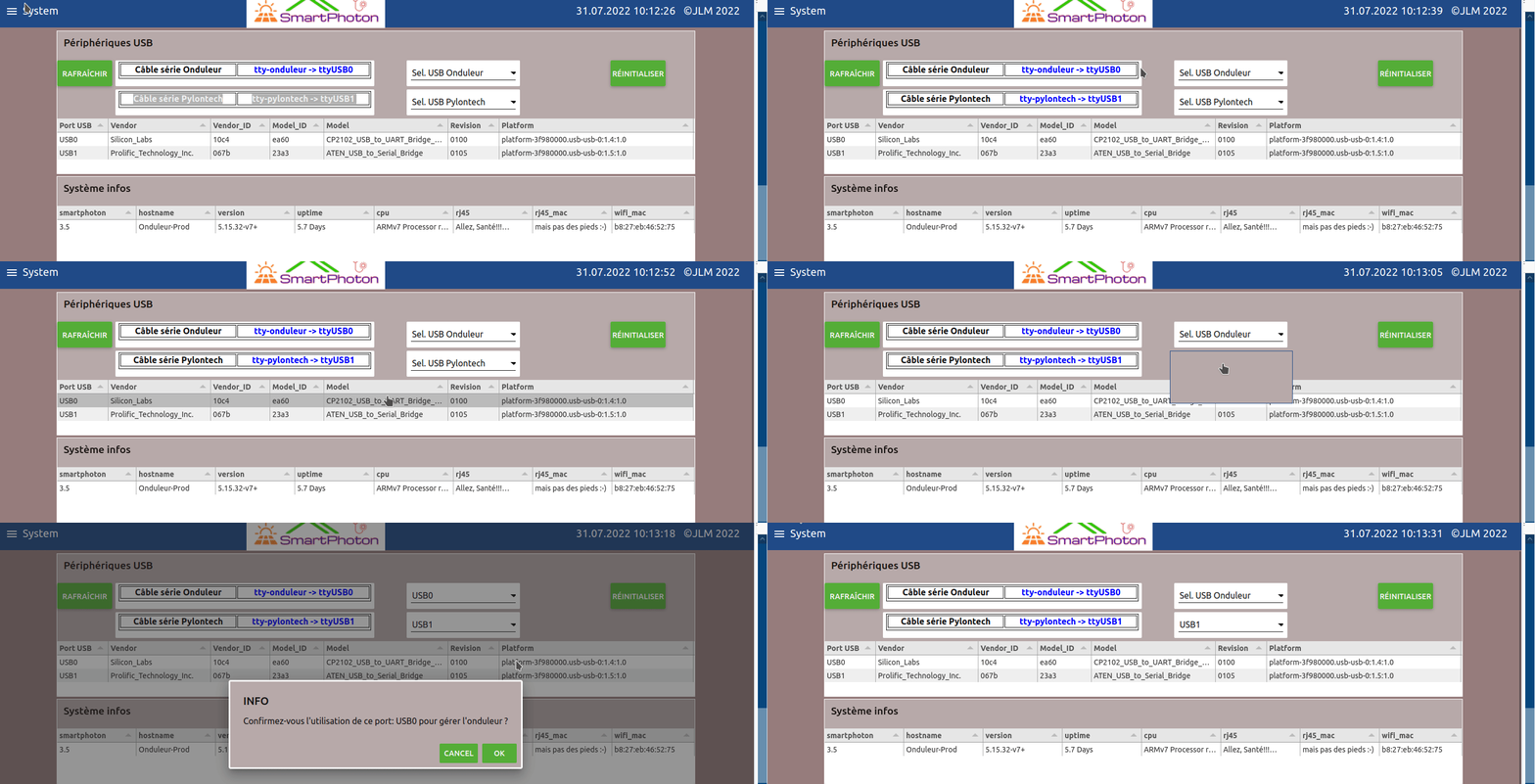
Then remember to restart Smartphoton so that the assignments are taken into account!
For a better information of the people who would like to address the 4 USB ports of a Raspberry, here is a schematic that I was able to realize while doing my tests. Here is the numbering of the USB ports

Pi 4 |
|
| USB haut gauche | USB haut droite |
| 0:1.3:1.0 | 0:1.1:1.0 |
| USB bas gauche | USB bas droite |
| 0:1.4:1.0 | 0:1.2:1.0 |
P.S did you notice the IP and MAC address 😉
https://smartphoton.ch/2-cables-serie-de-marque-identique-comment-les-reconnaitre-sous-linux/[:fr]Je fais une suite de l’article consacré au problème d’avoir 2 câbles USB-Série de la même marque et de la même référence. En effet je ne pouvais pas dans Smartphoton choisir quel câble allait vers tel équipement. Je n’avais rien pour les identifier. J’ai donc travaillé sur une refonte complète du menu ‘System – Périphériques USB’
Cela permettra à l’utilisateur de sélectionner lui même son câble onduleur et son câble batteries et de donner ainsi l’indication à mon logiciel où est comment accéder à chaque interface.
Le problème concret est celui-ci, 2 usb identiques, comment savoir lequel est l’onduleur et lequel est la batterie Pylontech :
| Bus 001 Device 005: ID 067b:23a3 Prolific Technology, Inc. ATEN USB to Serial Bridge |
| Bus 001 Device 004: ID 067b:23a3 Prolific Technology, Inc. ATEN USB to Serial Bridge |
J’ai pu adresser ce problème avec des commandes Linux qui me permettent de trouver où se trouve physiquement chaque câbles. Du coup je peux montrer chaque port USB avec ce qui est connecté et sur quel port USB. Cela ressemble à ceci.
Marche à suivre:
- Brancher le 1er câble USB, celui qui par exemple est branché à l’onduleur, aller dans le menu System et relever quel port USB Linux lui à assigné. Utiliser le bouton « Sel. USB Onduleur » et ‘valider’
- Procéder ensuite avec le 2ème câble et assigner celui ci avec le bouton « Sel. USB Pylontech »
Petite démo:
Pensez ensuite à redémarrer Smartphoton pour que les assignations soient prisent en compte !
Pour une meilleure information des personnes qui voudraient adresser les 4 ports USB d’un Raspberry, voici une schématique que j’ai pu réaliser en faisant mes essais. Voici la numérotation des ports USB
Pi 4 |
|
| USB haut gauche | USB haut droite |
| 0:1.3:1.0 | 0:1.1:1.0 |
| USB bas gauche | USB bas droite |
| 0:1.4:1.0 | 0:1.2:1.0 |
P.S avez vous remarqué l’adresse IP et MAC 😉
https://smartphoton.ch/2-cables-serie-de-marque-identique-comment-les-reconnaitre-sous-linux/[:]